Overview of Cocoa Support for Scriptable Applications
This chapter provides an overview of Cocoa scripting and how your application takes advantage of it, and provides links to more detailed information in other chapters and documents.
A scriptable application is one that scripters can control with AppleScript scripts. To create a scriptable application, you specify a dictionary of terms that scripters can use with your application, implement classes and methods to support scriptable features, and provide a road map of scriptability information that AppleScript and Cocoa use to allow scripts to control the application.
Cocoa scripting refers to the support provided by the Cocoa application framework for creating scriptable applications. It includes classes, categories, and scriptability information that specifies the supported AppleScript terminology and the class information needed to work with it.
Cocoa scripting makes use of standard mechanisms and design patterns used throughout Cocoa, including key-value coding (KVC) and Model-View-Controller (MVC). When an AppleScript command targets your application, the goal of the scripting support is to send the command directly to the application's model objects to perform the work. To do that, it relies on the KVC mechanism to get and set values in your application's scriptable model objects, based on a set of keys you define for them.
Through the use of these mechanisms, you can make your application scriptable with a minimum of additional code.
AppleScript and Scriptable Applications
AppleScript is a scripting language that makes possible direct control of scriptable applications and scriptable parts of the Mac OS (such as the Finder). The AppleScript language doesn’t supply an exhaustive or a task-specific terminology. Instead, it defines common commands, such as get, set, make, and delete, which can be applied to a wide variety of objects or their properties in a scriptable application. Scriptable applications define additional terms as needed for their unique operations.
A scriptable application is one that makes its operations and data available in response to AppleScript messages, called Apple events. An Apple event is a kind of interprocess message that can specify complex operations and data. Apple events make it possible to encapsulate a high-level task in a single package that can be passed across process boundaries, performed, and responded to with a reply event.
A scriptable application specifies the set of scripting terms it understands and provides information that AppleScript uses to compile scripts that use those terms. When a user executes a script that targets the application, Apple events are sent to the application. Apple events can also be sent by other applications and by the Mac OS.
Applications handle Apple events by registering with the Apple Event Manager for the events they expect to receive and by supplying handler routines to process the events. Cocoa scripting simplifies this process by automatically registering and responding to Apple events your application can handle, based on the scriptability information you supply. That means you don't need to write low-level code to interact with Apple events and the Apple Event Manager.
AppleScript and Apple events are built on the Open Scripting Architecture (OSA), which is described in Open Scripting Architecture in AppleScript Overview.
The AppleScript Object Model
Every scriptable application defines an AppleScript object model to specify the classes of objects a scripter can work with in scripts, the accessible properties of those objects, and the inheritance and containment relationships for those classes. Inheritance allows a class to access the properties of its ancestors. Containment specifies where an object resides within the hierarchy of objects in the running application.
The objects in the object model often correspond closely to object classes in the application that implement scripting support, but there is no requirement that they do so. For example, a text application might provide script access to words in a document, but it would not be efficient for the application to maintain a corresponding object for each word.
Application classes have attributes, to-one relationships, and to-many relationships. AppleScript classes in the object model have properties and elements—properties are synonymous with attributes and to-one relationships, while elements are synonymous with to-many relationships. For more information on these and related terms, see the Glossary.
Figure 1-1 shows the object-model containment hierarchy for a specific document (shown in Figure 1-2) in the Sketch application. On the left are the objects a scripter uses to work with the application. On the right are the objects that Sketch uses to represent its object model.
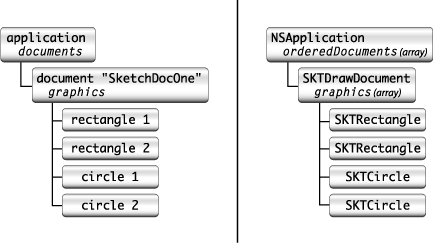
In this object model, documents are elements of the application object and graphics are elements of document objects, while the name of a document is a property of the document. For a script to access an object in the hierarchy, it must locate the object within its containment hierarchy. (In the application, the orderedDocuments array is a to-many relationship of the NSApplication object.)
Consider, for example, the following sample script:
tell app "Sketch" to set the x position of rectangle 1 of document "SketchDocOne" to 25 |
This script specifies a rectangle, in a document, in the application. If applied to the following Sketch document, it would set the horizontal (x) position for whichever of the two rectangle shapes is first in the document's ordered list of graphics.
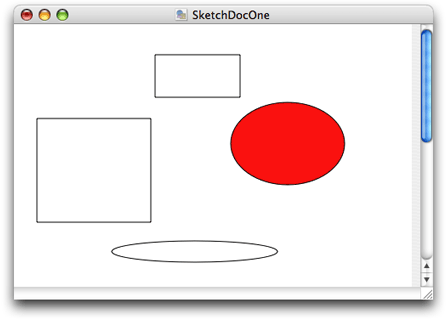
A script can ask for rectangle 1 of document "SketchDocOne" without having to specify either graphics or documents (though they are part of the hierarchy shown above) because an AppleScript class definition implicitly specifies the relationships of its contained elements.
Sketch's object model uses inheritance for its graphics objects. All such objects (rectangle, circle, image, line, and text area) inherit from a common ancestor (graphic). Thus the term graphic 1 of document "SketchDocOne" might specify the same object as rectangle 1 of document "SketchDocOne", depending on the ordering of the objects in the graphics array.
Scriptability Information
A scriptable application supplies scriptability information that formally lays out the AppleScript object model for the application and maps it to application objects. This scriptability information does two things:
It specifies the terminology available for use in scripts that target the application and supplies comments on the purpose and usage for that terminology.
It provides information, used by AppleScript and by Cocoa, about how support for that terminology is implemented in the application.
This information includes the KVC keys that Cocoa scripting uses to gain access to attribute and relationship information in the application's classes. Without these keys, scripts would not be able to manipulate properties of scriptable objects in the application's object model.
To uniquely identify terms in its scriptability information, an application uses constants called four-character codes (or Apple event codes). A four-character code is just four bytes of data that can be expressed as a string of four characters in the Mac OS Roman encoding. These codes are described in Code Constants Used in Scriptability Information.
Within an application's scriptability information, terminology associated with related functionality (for example, operations involving text, graphics, or databases) are generally collected into suites. Cocoa provides the predefined suites described in Built-in Support for Standard and Text Suites.
AppleScript uses the application’s scriptability information, including four-character codes, to compile scripts and send Apple events to the application. Cocoa uses the information to interpret received Apple events and create script command objects to perform the specified operations.
Scriptability Information Formats
You define your application’s scriptability information using one of two formats. The first is the scripting definition or sdef format. This is an XML-based format that describes a set of scriptability terms and the commands, classes, constants, and other information that describe the application's scriptability. The sdef format was introduced in OS X version 10.2 and is used natively by Cocoa starting in OS X version 10.4. In the sdef format, an application's scriptability information is contained in a single scripting definition (or sdef) file, with the extension .sdef. The word sdef can be used to describe either the format or a file in that format.
A second, older format uses property list files and is referred to as the script suite format. It supplies Cocoa and AppleScript with roughly the same information, in the form of a script suite file and a corresponding script terminology file:
A script suite file describes scriptable objects in terms of their attributes, relationships, and supported commands, and has the extension
.scriptSuite.A script terminology file provides AppleScript terminology—the English-like words and phrases a scripter can use in a script—for the class and command descriptions in the corresponding script suite file. Script terminology files have the extension
.scriptTerminology.
Defining scriptability information with either of these formats is a bit like defining your application interface with nib files, though you work with text rather than a graphic editor. In both cases you provide information up front that Cocoa uses at specific times to create objects and provide support for the task at hand. The information from an sdef (or the older property list form) is loaded just once per application launch, as described in Loading Scriptability Information. The loaded information is then used as needed to create script command objects to perform scriptable operations.
A scripting definition file follows the XML format defined in the sdef man page and described in more detail in Preparing a Scripting Definition File. Figure 1-3 shows the main XML elements in an sdef file.
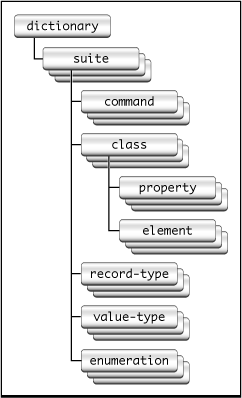
As an example of specific sdef elements, Listing 1-1 shows the graphic and rectangle definitions from Sketch's sdef file. The graphic class defines several properties (such as x position and y position) that are inherited by other shape classes. The rectangle class adds an orientation property and specifies that the object responds to the rotate command, which is specific to rectangles.
Listing 1-1 Graphic and rectangle elements from Sketch's sdef file
... (from the Sketch suite) |
<class name="graphic" code="grph" |
description="A graphic. This abstract class represents the |
individual shapes in a Sketch document. |
There are subclasses for each specific type of graphic."> |
<cocoa class="SKTGraphic"/> |
<property name="x position" code="xpos" type="real" |
description="The x coordinate of the graphic's bounding rectangle."/> |
<property name="y position" code="ypos" type="real" |
description="The y coordinate of the graphic's bounding rectangle."/> |
<property name="width" code="widt" type="real" |
description="The width of the graphic's bounding rectangle."/> |
... (some properties omitted) |
</class> |
<class name="rectangle" code="d2rc" inherits="graphic" |
description="A rectangle graphic."> |
<cocoa class="SKTRectangle"/> |
<property name="orientation" code="orin" type="orientation"/> |
<responds-to name="rotate"> |
<cocoa method="rotate:"/> |
</responds-to> |
</class> |
Viewing Scripting Terminology
Users typically examine scripting terminology in a dictionary viewer to discover which features are scriptable and how to script an application. You can view the scripting terminology for a scriptable application with Script Editor or Xcode. Figure 1-4 shows the sdef file from the Sketch application in a dictionary viewer, with the graphic and rectangle classes visible.
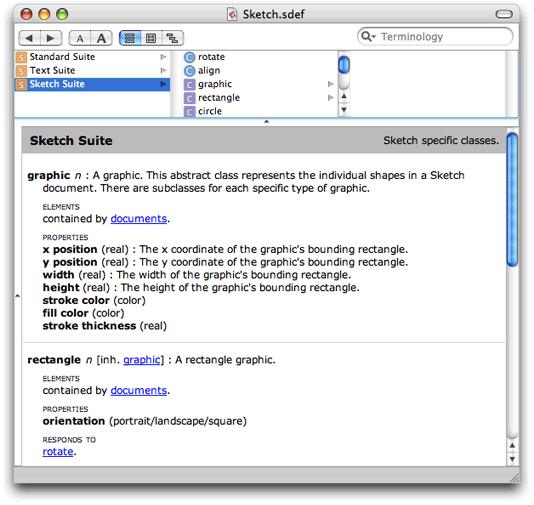
Double-clicking an sdef file in the Finder opens it in a dictionary viewer like the one shown above. Double-clicking an sdef file in an Xcode project similarly opens it in a dictionary viewer window. To view or edit the XML for the file, open the sdef file with any plain text editor; in Xcode, select the sdef file and choose File > Open As > Plain Text File.
For related information, see Editing Scriptability Information.
Built-in Support for Standard and Text Suites
A scriptable application typically supports certain standard AppleScript terms, such as the count and make commands and the application class. Cocoa provides built-in support for these terms in the Standard suite. It also provides command classes, including NSCountCommand and NSCreateCommand, to implement standard commands. In addition, classes such as NSApplication and NSDocument implement certain aspects of standard scripting support.
Cocoa scripting also provides support for the get and set commands, including implementation of the command classes NSGetCommand and NSSetCommand. These commands are not part of the Standard suite, but are considered built-in AppleScript commands. Allowing scripters to get and set the values of properties and elements of scriptable objects is a key part of making an application scriptable.
The Standard suite defines the following AppleScript commands: (for all classes) copy, count, create, delete, exists, and move; (for documents and windows) print, save, close. Note that there is no default implementation for the print command—see Print for information on how to support printing.
To support text-related classes such as rich text, word, and paragraph, Cocoa implements the Text suite.
Cocoa’s built-in support for the Standard and Text suites is described in more detail in Use the Document Architecture and Access the Text Suite. To include it in your application, you follow the steps described in Turn On Scripting Support in Your Application.
Built-in Support for Basic AppleScript Types
Cocoa scripting provides built-in support for basic AppleScript types and automatically associates them with appropriate Cocoa data types, as shown in Table 1-1. You can use these types without declaring them in your sdef file.
AppleScript type | Cocoa type | Code |
|---|---|---|
| ||
| ||
| ||
| ||
| ||
| ||
| ||
|
| |
| ||
This type is used as the type of the |
| |